 Skip to content

Quick answer
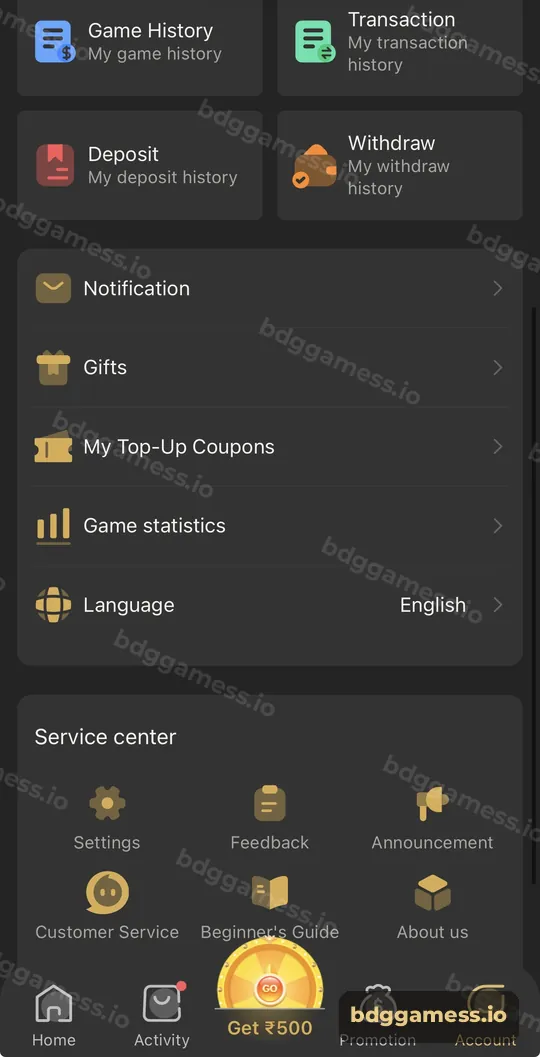
BDG Game history lives on the Account tab: Game History shows your bets, Transaction shows every balance movement, Deposit and Withdraw show payment records with status, and Game statistics summarises your play. Check them weekly to track spending and use them when contacting support.
Where are your BDG Game records?
Four record tiles sit just below the wallet on the Account tab.
| Record | What it shows |
|---|---|
| Game History | Your bets and results by game |
| Transaction | Every credit and debit on your balance |
| Deposit | Deposit orders, amounts and status |
| Withdraw | Withdrawal requests, method and status |
Further down, Game statistics summarises your play over time.
How do you use history to manage your budget?
- Open Game statistics each week.
- Compare total bets with what you planned to spend.
- Check Transaction for deposits you may have forgotten.
- If spending is higher than planned, set a lower limit or take a break.
How does history help with payment problems?
- Deposit missing: find the order in Deposit history and note its number for support.
- Withdrawal pending: Withdraw history shows its status and time.
- Unknown activity: Transaction reveals any movement you don’t recognise.
What else is on the Account tab?
Notification, Gifts, My Top-Up Coupons, Game statistics and Language, then the Service center with Settings, Feedback, Announcement, Customer Service, Beginner’s Guide and About us.
New to the platform? Start with our main BDG Game guide for the full picture.
History FAQs
How far back does BDG Game history go?
Each record screen lets you browse past entries; use filters where available.
Can I delete my game history?
Records are kept for your account and support reference.
Where are my coupons?
Account → My Top-Up Coupons.
Why does Transaction show entries I don’t recognise?
They may be bonuses or rebates. If unsure, ask support with your UID.
Where are lottery results for a round?
Each game screen shows recent results, and your own bets appear in Game History.
Key takeaways
- Game History, Transaction, Deposit and Withdraw records on the Account tab.
- Game statistics helps you track spending.
- Use records as evidence when contacting support.
