 Skip to content

Quick answer
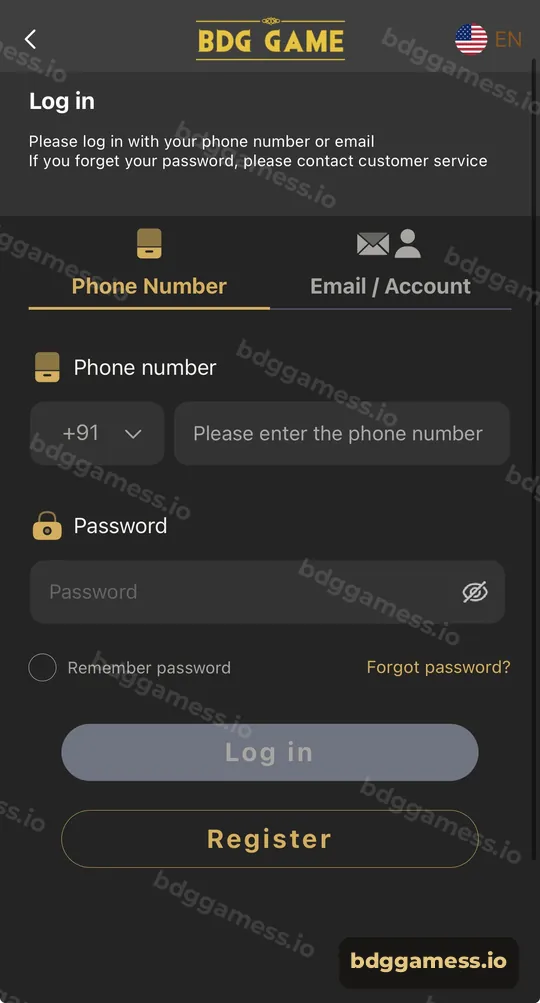
On the BDG Game login page, tap “Forgot password?”. The screen itself notes that if you forget your password you should contact customer service. Have your registered phone number or email and your UID ready, use only the in-app Customer Service, and set a new password you haven’t used before.
How does BDG Game password recovery work?
Recovery is handled by the platform’s customer service team rather than a fully automatic reset. The login page says it plainly: “If you forget your password, please contact customer service.” That protects accounts from being reset by someone who only knows your number.
What steps should you follow?
- On the login page, tap Forgot password? and follow any prompt shown.
- If asked, or if no reset option appears, open Customer Service from the home screen header.
- Give your registered phone number or email and your UID if you know it.
- Answer the verification questions support asks.
- Once reset, log in and change your password again to one only you know.
What details should you prepare?
| Detail | Where to find it |
|---|---|
| Registered phone or email | The number or email you signed up with |
| UID | Account tab, under your username (note it while you still can) |
| Recent deposit info | Deposit history, or the UTR from your UPI app |
| Approximate balance | Your last remembered balance |
How do you avoid password recovery scams?
- Never pay for a “password recovery service.” Support doesn’t charge.
- Never share your OTP or UPI PIN. No recovery step needs them.
- Use only the in-app Customer Service button, not numbers posted in comment sections.
More tips are on the account security page.
How do you choose a better password?
Use at least eight characters mixing letters and numbers, don’t reuse your email or UPI password, and store it in a password manager. If you suspect anyone else knows it, change it right away and review your transaction history.
New to the platform? Start with our BDG Game homepage for the full picture.
Forgot password FAQs
Can I reset my BDG Game password by OTP?
The login page directs you to customer service if you forget your password. Follow what support tells you.
How long does password recovery take?
It depends on support volume and how quickly you can verify ownership. Having your UID ready helps.
Will I lose my balance if I forget my password?
No. Your balance stays in your account; you just need to regain access.
Can someone else reset my password?
Verification by customer service is designed to stop that. Never share your details with anyone.
Where do I change my password once logged in?
Look under Account → Settings.
Key takeaways
- Forgot password routes to customer service.
- Prepare phone/email, UID and a recent deposit reference.
- Never pay or share OTPs for “recovery”.
