 Skip to content

Quick answer
To add a bank account on BDG Game, open Account → Withdraw, tap BANK CARD, UPI or USDT, then add your details: account holder name, bank and account number with IFSC for a bank card, your UPI ID for UPI, or your wallet address for USDT. Check every character; the app warns that losses from incorrect details are your responsibility.
Which withdrawal accounts can you add?
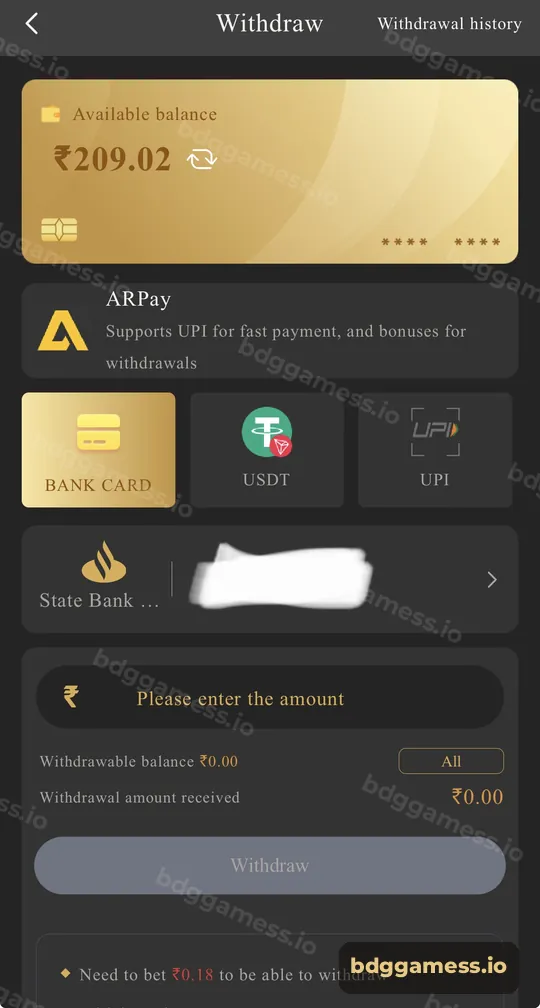
The Withdraw screen shows three method tiles: BANK CARD, USDT and UPI. Above them, ARPay is offered for AR Wallet users.
How do you add a bank card?
- Go to Account → Withdraw and tap BANK CARD.
- Tap the bank row or the add option.
- Enter the account holder’s name exactly as in your bank.
- Choose your bank, then enter the account number and IFSC.
- Save and check the masked number displayed.
How do you add UPI or USDT?
- UPI: tap UPI and enter your UPI ID (for example name@bank). Use an ID in your own name.
- USDT: tap USDT and paste your wallet address. Confirm the network your wallet uses.
What details cause the most trouble?
| Mistake | Result |
|---|---|
| Name doesn’t match bank records | Withdrawal can be returned |
| Wrong IFSC | Payment fails or is delayed |
| Typo in UPI ID | Money may go nowhere or be returned |
| Wrong USDT network | Funds can be lost |
How do you change wrong details?
The withdrawal rules say: if your registered bank information is incorrect, contact customer service. Message them with your UID and the correct details. See customer care.
New to the platform? Start with our bdggamess.io for the full picture.
Bank account FAQs
Can I add more than one withdrawal method?
The Withdraw screen supports Bank Card, UPI and USDT, so you can set up the ones you use.
Can I use someone else’s bank account?
Use an account in your own name to avoid returned withdrawals.
How do I edit my bank details?
Contact Customer Service if registered bank details are wrong.
Is my bank number visible to others?
The app shows the bank name with the number partly hidden.
Do I need a bank account to withdraw?
You can also withdraw by UPI or USDT.
Key takeaways
- Add Bank Card, UPI or USDT under Withdraw.
- Match the name to your bank records.
- Wrong details? Contact customer service.
