 Skip to content

Quick answer
If a BDG Game deposit isn’t credited, wait 5–10 minutes and refresh your balance, check Deposit history for the order status, confirm you paid the exact amount before the timer ended, then send Customer Service your UID, order number, amount, time and UTR with a payment screenshot. Never cancel the order or pay a second time.
Why hasn’t my BDG Game deposit arrived?
Nearly every delayed deposit has one of five causes.
| Cause | How to tell | What to do |
|---|---|---|
| Normal processing delay | Paid in the last few minutes | Wait, then refresh balance |
| Amount mismatch | Paid a different figure than the order | Contact support with UTR |
| Timer expired | Paid after the countdown ended | Contact support with UTR |
| Order cancelled | Order shows cancelled in history | Contact support; don’t repay |
| Bank-side pending | UPI app shows pending | Wait for your bank to confirm |
What steps should you follow?
- Refresh the balance bar on the home screen.
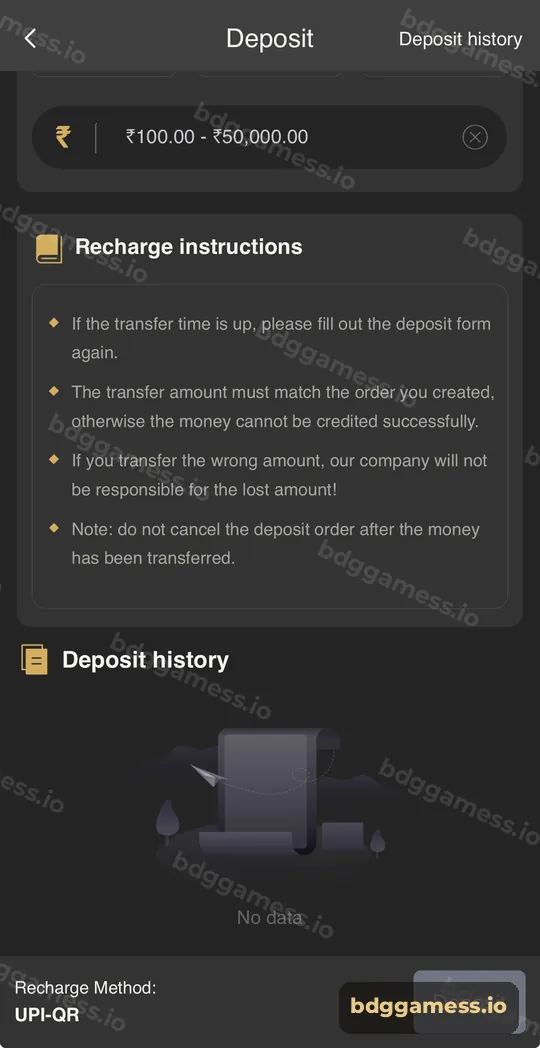
- Open Deposit history and find the order.
- Open your UPI app and copy the 12-digit UTR from the payment.
- Check the amount you paid against the order.
- Contact Customer Service with UID, order number, amount, time, UTR and a screenshot.
Why does the notice bar mention the UTR?
The scrolling notice on the BDG Game home screen asks players to remember the UPI ID of their payment and fill in the correct UTR number. When a deposit is checked manually, the UTR is how the payment is traced, so keep it safe.
How do you avoid this problem next time?
- Always create a fresh order; never reuse an old QR.
- Pay the exact amount shown, including any paise.
- Pay before the timer ends.
- Don’t cancel after paying.
- Screenshot the payment success screen.
What about USDT deposits?
For crypto, check the network confirmations and that you sent at least 10 USDT; smaller amounts aren’t credited. Share the transaction hash with support. Details: USDT deposit.
New to the platform? Start with our full BDG Game guide for the full picture.
Deposit not received FAQs
How long should I wait before contacting support?
Give it 5–10 minutes and refresh. If the order still isn’t credited, contact support with your UTR.
Should I pay again?
No. Paying again doesn’t fix the first payment and may create a second issue.
Where is the UTR number?
In the transaction details of your UPI app; it’s usually 12 digits.
My money left my bank but the order expired. What now?
Send support the UTR and screenshot so they can trace the payment.
Can I cancel a deposit after paying?
The recharge instructions say not to cancel the order after transferring.
Key takeaways
- Wait, refresh, then check Deposit history.
- Find your UTR and confirm the amount matched.
- Contact support with full details; never pay twice.
