 Skip to content

Quick answer
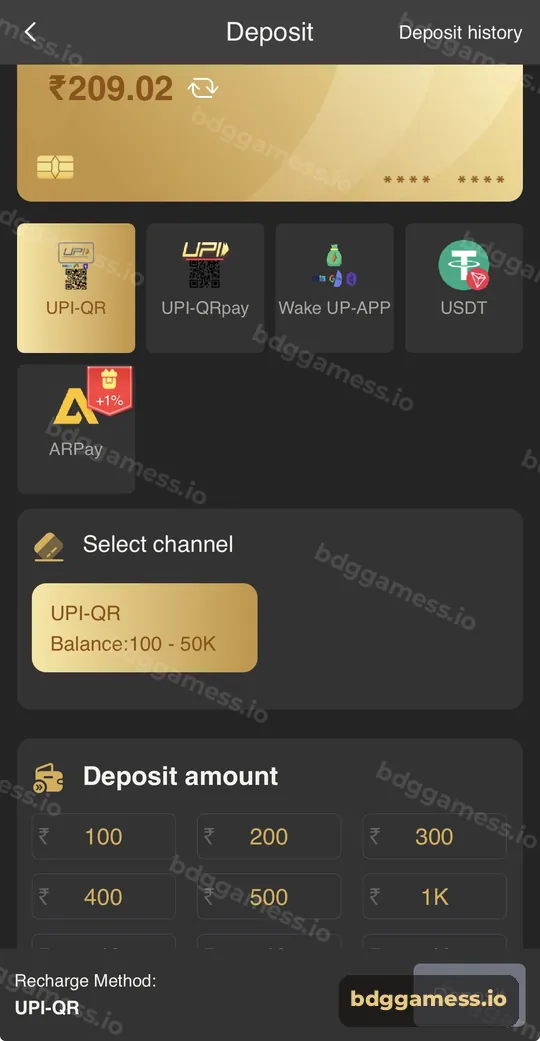
To deposit on BDG Game, open Account → Deposit, choose UPI-QR, UPI-QRpay, Wake UP-APP, USDT or ARPay, select a channel whose range fits your amount, enter or tap an amount (from ₹100, up to ₹50,000 in the entry box), pay the exact amount the order shows, and don’t cancel the order after paying.
What deposit methods does BDG Game offer?
Five methods appear at the top of the Deposit screen.
| Method | How you pay | Notes from the app |
|---|---|---|
| UPI-QR | Scan a QR with any UPI app | Channel shown as ₹100 – 50K |
| UPI-QRpay | QR through partner channels | Many channels, each with its own range |
| Wake UP-APP | Opens your UPI app directly | Handy on mobile |
| USDT | Send USDT via FireLink, Tether or Binance channel | Minimum 10 USDT |
| ARPay | Pay through AR Wallet | Tagged +1% on the deposit screen |
How do you make a BDG Game deposit?
- Tap Account → Deposit (or the Deposit shortcut under your balance).
- Pick a method from the top row.
- Under Select channel, choose one whose balance range covers your amount.
- Tap a quick amount (₹100, ₹200, ₹300, ₹400, ₹500, ₹1K, ₹2K, ₹3K, ₹5K) or type your own.
- Tap Deposit at the bottom; the bar shows the method you chose.
- Pay the exact amount in your UPI app or wallet before the timer ends.
- Return to BDG Game and check Deposit history.
Which UPI-QRpay channels are available and what are their limits?
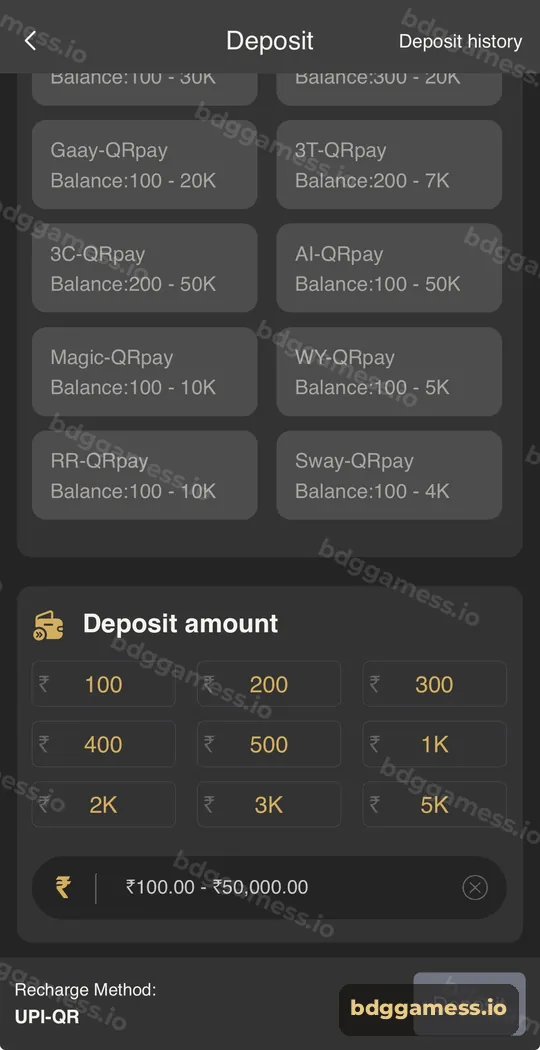
Each channel prints its own range, so match the channel to your amount. These were shown in the app at the time of writing:
| Channel | Range |
|---|---|
| UPI-QR | ₹100 – 50K |
| IC2-QRpay | ₹200 – 3K |
| Nexa-QRpay | ₹500 – 6K |
| Bull2-QRpay | ₹100 – 30K |
| 7DAY-QRpay | ₹300 – 20K |
| Gaay-QRpay | ₹100 – 20K |
| 3T-QRpay | ₹200 – 7K |
| 3C-QRpay | ₹200 – 50K |
| AI-QRpay | ₹100 – 50K |
| Magic-QRpay | ₹100 – 10K |
| WY-QRpay | ₹100 – 5K |
| RR-QRpay | ₹100 – 10K |
| Sway-QRpay | ₹100 – 4K |
Channels are added and removed over time, so always read the range on screen.
What rules make sure your deposit is credited?
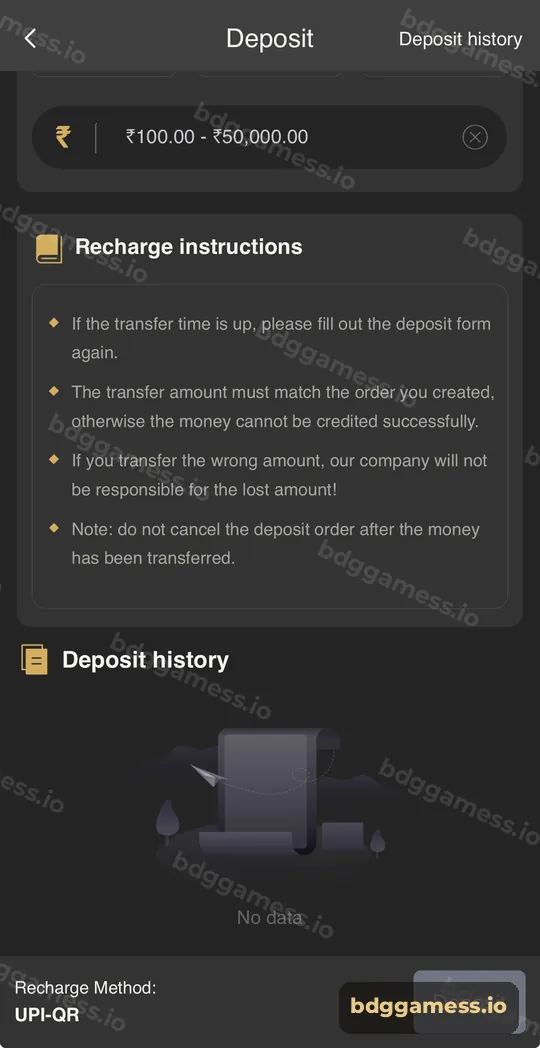
The Recharge instructions box spells them out:
- If the transfer time is up, fill in the deposit form again.
- The transfer amount must match the order you created, or it can’t be credited.
- If you transfer the wrong amount, the platform says it is not responsible for the loss.
- Do not cancel the deposit order after the money has been transferred.
The home-screen notice adds one more: remember the UPI ID you paid and fill in the correct UTR number if a deposit needs checking.
Which deposit method should you choose?
- Small, quick deposits: UPI-QR or Wake UP-APP.
- A specific amount that one channel caps: pick a QRpay channel with a higher ceiling, such as AI-QRpay or 3C-QRpay.
- Crypto holders: USDT deposit.
- Frequent players who also withdraw to AR Wallet: ARPay.
What if your deposit doesn’t show up?
Wait a few minutes, refresh your balance, then check Deposit history. If it’s still missing, follow the deposit not received guide and send support your UTR.
New to the platform? Start with our BDG Game homepage for the full picture.
BDG Game deposit FAQs
What is the minimum deposit on BDG Game?
The amount box starts at ₹100. Some channels start higher, such as ₹200, ₹300 or ₹500. USDT starts at 10 USDT.
What is the maximum deposit on BDG Game?
The rupee entry box goes up to ₹50,000, and channels such as UPI-QR, 3C-QRpay and AI-QRpay show 50K ceilings.
Can I deposit with PhonePe, Paytm or Google Pay?
Yes. UPI-QR and QRpay channels work with any UPI app that can scan a QR code.
Why must the amount match exactly?
Deposits are matched to orders by amount. A different amount may not credit automatically.
Is there a deposit bonus?
Recharge bonuses run in the Activity tab from time to time. Check the current banner’s terms.
Where can I see my deposits?
Account → Deposit history, or the Deposit history link at the top of the Deposit screen.
Key takeaways
- Five methods: UPI-QR, UPI-QRpay, Wake UP-APP, USDT, ARPay.
- Choose a channel whose range fits your amount.
- Pay the exact order amount and never cancel after paying.
- Keep your UTR in case support needs it.
