 Skip to content

Quick answer
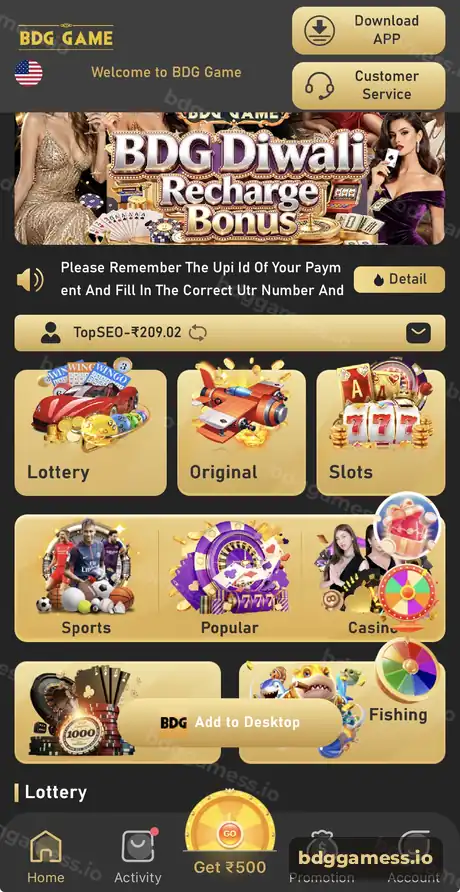
The BDG Game app gives you the lobby, wallet, Activity rewards and Promotion dashboard in one place. Android users install it from the Download APP button at the top of the home screen; iPhone users add the web app to the home screen. Log in with the same phone or email and password you use in the browser.
What does the BDG Game app include?
Everything the website has, arranged around five bottom tabs. Home, Activity, Get ₹500, Promotion and Account sit at the bottom of every screen, and the header keeps Download APP and Customer Service a tap away.
| Tab | What you do there |
|---|---|
| Home | Banners, notice bar, balance, game tiles |
| Activity | Bonuses, gift codes, attendance, event banners |
| Get ₹500 | The centre reward button |
| Promotion | Agency stats, invitation link and code |
| Account | Wallet, deposit, withdraw, VIP, history, support |
How do you install the BDG Game app?
There are two routes, depending on your phone.
- Android: log in through the browser, tap Download APP in the header (or the Add to Desktop bar in the lobby), download the file and allow installation when Android asks. Full steps: BDG Game download guide.
- iPhone: open the site in Safari, tap Share, then Add to Home Screen. Steps: BDG Game on iPhone.
What should you check after installing?
- Log in and confirm your username and balance appear.
- Open Account → Language and pick your preferred language.
- Visit Notification and Announcement for current notices.
- Add your withdrawal bank card or UPI in advance.
- Note your UID for support.
App or browser: which is better?
| Point | App / home-screen icon | Browser |
|---|---|---|
| Speed to open | One tap | Type or find the link |
| Stays logged in | Usually | Depends on cookies |
| Storage used | Small | None |
| Updates | Reinstall when prompted | Always current |
How do you keep the BDG Game app safe?
Only install from the in-app Download APP button. Delete any copy you got from a chat group, and never install a “mod” or “hack” version; see our hack warning. If the app misbehaves, follow the update guide.
New to the platform? Start with our BDG Game overview for the full picture.
BDG Game app FAQs
Is the BDG Game app free?
Yes, downloading and installing the app costs nothing.
Is the BDG Game app on the Play Store?
Install it from the Download APP button inside the platform. Be careful with look-alike apps in stores using similar names.
Can I use the same account on the app and website?
Yes. Your login, balance and history are the same everywhere.
Does the app support Hindi?
The Account → Language option lets you change the interface language where available.
What is Add to Desktop in the BDG Game app?
It is a lobby shortcut that adds the platform to your phone’s home screen for quick access.
Key takeaways
- Five tabs: Home, Activity, Get ₹500, Promotion, Account.
- Android: Download APP button; iPhone: Add to Home Screen.
- Install only from inside the platform.
